H2H Digital Rx logo

Help Center

  • Prescriber’s Digest
  • Help Center
  • Go to H2H Digital Rx Website
  • Schedule a Demo
  • Technical API Documentation
  • Sign-up for eRx
  • Login
Menu
  • Prescriber’s Digest
  • Help Center
  • Go to H2H Digital Rx Website
  • Schedule a Demo
  • Technical API Documentation
  • Sign-up for eRx
  • Login
H2H Digital Rx logo

How can we help?

Generic selectors
Exact matches only
Search in title
Search in content
Post Type Selectors
help_center
  • Help Center Categories

    • Account Management
    • E-prescribing
    • Enrollment and Setup
    • ID Proofing & 2FA
    • Refill, RxFill & RxChange prescriptions
    • Reports
    • Value-Added Features
    • Videos
Can't find what you're looking for?

We'll help you find the answer. Please connect with our support agent at +1 (248) 896-9190 / +1 (313) 550-7647, or shoot an email to drxsupport@h2hsolutions.com.

Help Center Account ManagementProfile Settings in MFA process

Profile Settings in MFA process

When sending an EPCS prescription, a Two-Factor Authentication (2FA) popup appears, offering two options to complete the process:

  1. Redirecting to the ID.me site.
  2. Completing 2FA through the H2H DigitalRx application.

You can select one of these options and choose to save your preference by checking the “Save preference” checkbox. This selection will be applied automatically for future attempts and will also be displayed in your profile settings as “ID.me MFA Route.”
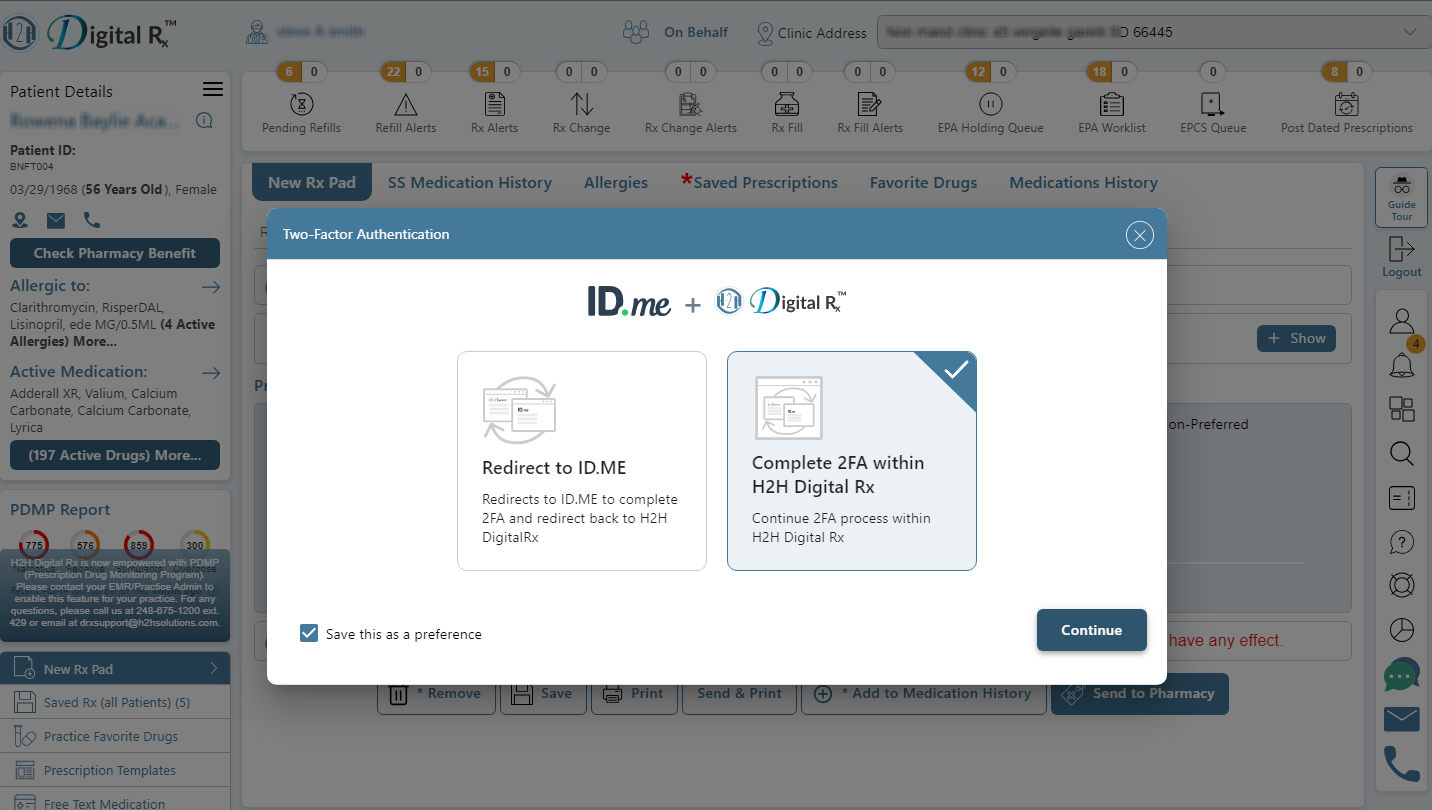
Note: To change the previously saved MFA Route, you can toggle the option on or off directly from the profile settings.
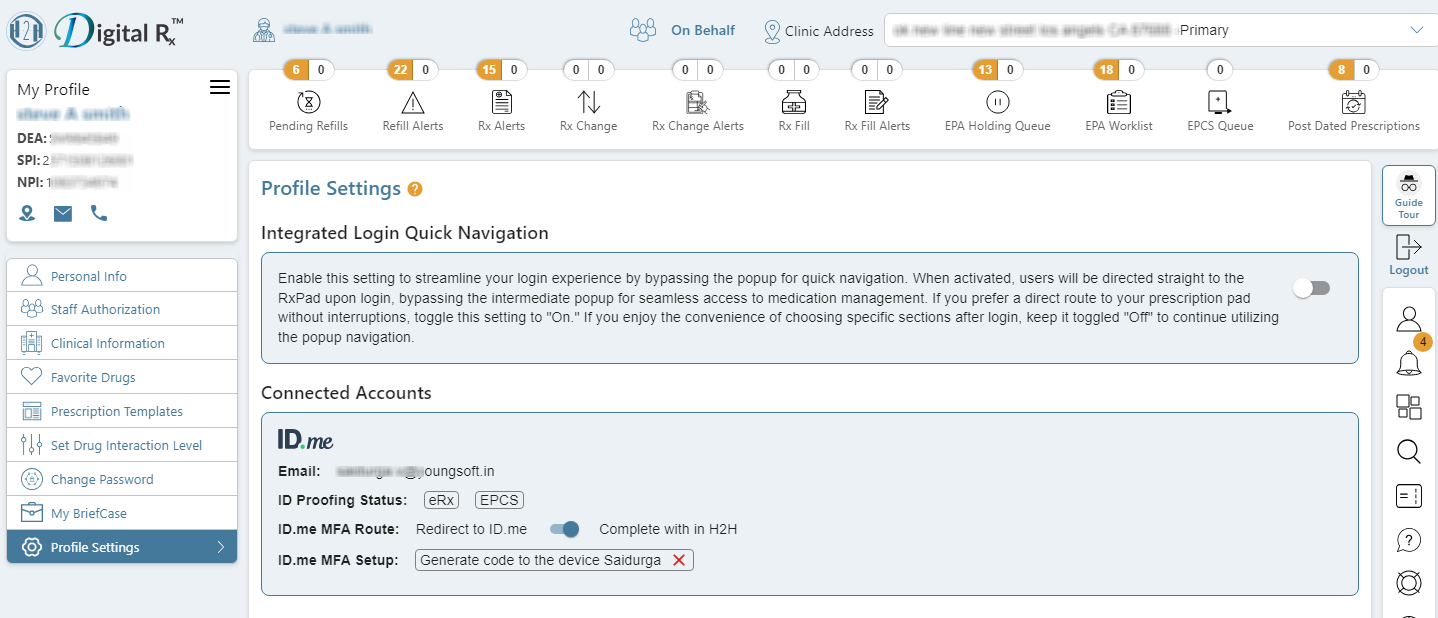
How to change MFA setup option

When sending an EPCS prescription, you can select an MFA option and choose to save your preference by checking the “Save preference” checkbox. This will automatically direct you to the same option for future attempts, without displaying all available MFA options.

To change this setting, you can delete the saved preference from the profile settings. Once deleted, all MFA options will be shown again for future attempts.
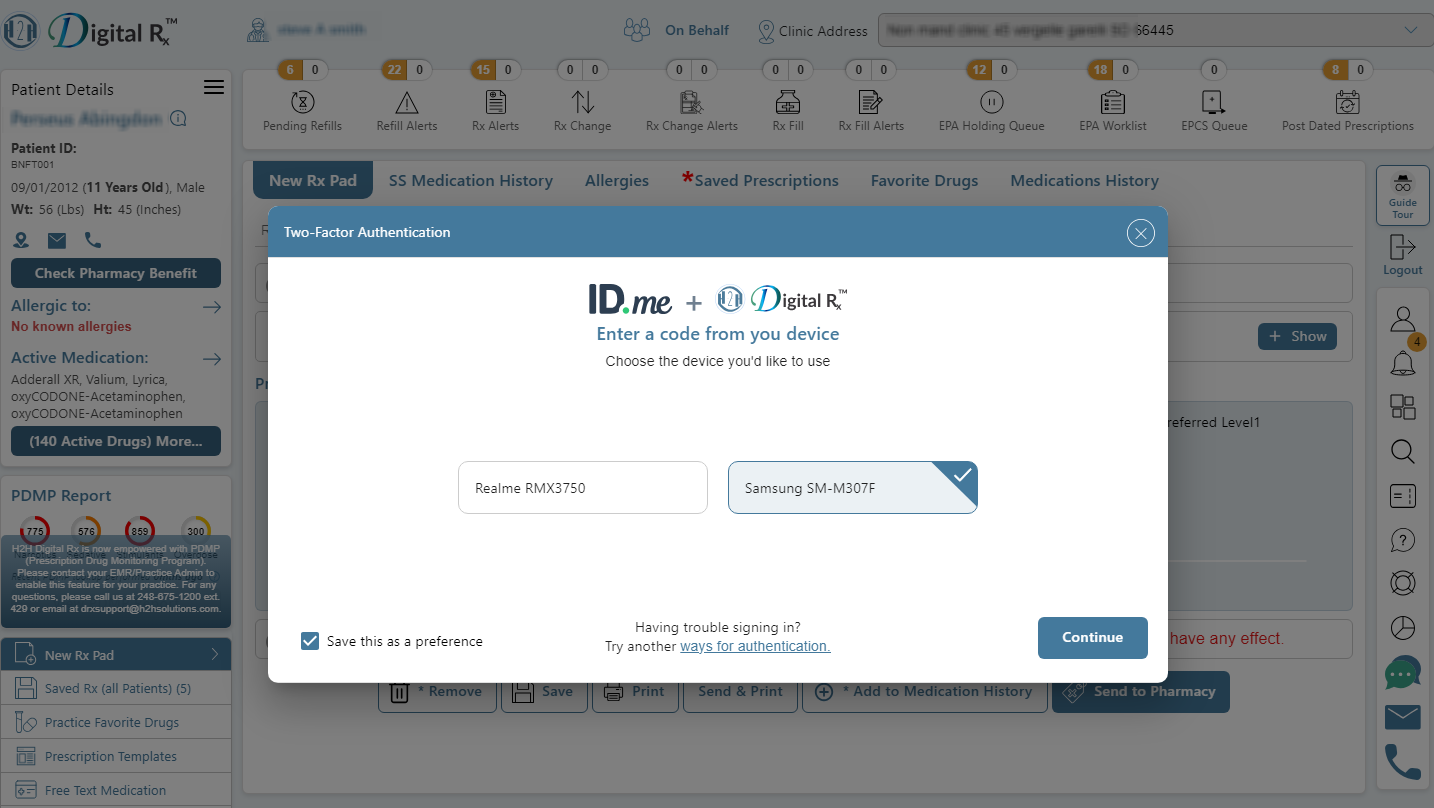
Note: If you want to view all available MFA options, even after saving your preference, click on the “Ways for Authentication” option. This will display all available options at that time.


Was this article helpful?

2Total

2 Yes

Thanks for your feedback!

2Total

2 Yes

Copyright © 2025 H2H Solutions, Inc.
All rights reserved.
H2H Solutions, Inc. 49197 Wixom Tech Drive Suite B, Wixom, MI 48393, USA
Phone: +1 (248) 896-9190 / +1 (313) 550-7647 , Fax: (248)-675-1201 Email: info@h2hsolutions.com
  • Privacy Policy
  • Terms of Use

H2H DigitalRx, powered by H2H Solutions, is a cloud-based, Surescripts-certified, HIPAA-compliant e-prescribing solution with an intuitive user experience. It delivers real-time benefits and formulary data to support safe, efficient prescribing.

With integrated clinical decision support, including insurance-specific formulary and eligibility, medication history, and drug and allergy interaction checks, it enables informed decisions and seamless prescription transmission to pharmacies of choice.

H2H Solutions, Inc.
49197 Wixom Tech Drive Suite B,
Wixom, MI 48393, USA  
+1 (248) 896-9190  
+1 (313) 550-7647  
(248)-675-1201  
info@h2hsolutions.com
  • Prescriber’s Digest
  • Schedule a Demo
  • Sign-up for eRx
  • Help Center
Copyright © 2026 H2H Solutions, Inc. All rights reserved.
  • Privacy Policy
  • Terms of Use
  • Prescriber’s Digest
  • Help Center
  • Go to H2H Digital Rx Website
  • Schedule a Demo
  • Technical API Documentation
  • Sign-up for eRx
  • Login
Menu
  • Prescriber’s Digest
  • Help Center
  • Go to H2H Digital Rx Website
  • Schedule a Demo
  • Technical API Documentation
  • Sign-up for eRx
  • Login